
Modular Monitor Mounts
A modular monitor stand is built from parts that click together: a desk clamp, grommet or wall base, a pole, and arms you can add, swap or move. Mount-It! modular mounts hold 1 to 4 screens up to 34", with arms rated from 14.8 to 44 lb, and VESA 75x75 or 100x100 plates. Monitor and laptop combos add a laptop tray with a cooling fan. Most are CLiX Series and TAA compliant.
Why choose a Mount-It! Modular Mount?
- Premium products made from cast aluminum
- Fully customizable for all your monitor mounting needs
- Expand your workspace as you see fit
- Multiple component integration
- Sleek design for just the right look
- TAA Compliant – Ideal for Government purchases
For every monitor arm we sell, from single arms to quad mounts, see monitor arms and mounts.


 CLiX Series15% OFF with code EYELEVEL26
Full Motion Dual Monitor + Laptop Mount with Cooling Fan
SKU: MI-75826
Monitor sizes: 13" - 32"
Holds up to 19 lb per monitor
In stock
 CLiX Series15% OFF with code EYELEVEL26
Full Motion Single Monitor + Laptop Mount with Cooling Fan
SKU: MI-75816
Monitor sizes: 13" - 32"
Holds up to 19 lb
In stock
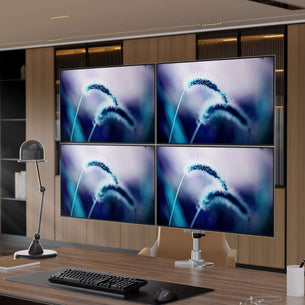 CLiX Series15% OFF with code EYELEVEL26
Full Motion Quad Monitor Desk Mount
SKU: MI-63156
Monitor sizes: 13" - 32"
Holds up to 19 lb per monitor
In stock
 CLiX Series15% OFF with code EYELEVEL26
Full Motion Quad Monitor Desk Mount with Gas Spring Arms
SKU: MI-65156
Monitor sizes: 13" - 32"
Holds up to 19 lb per monitor
In stock
 CLiX Series15% OFF with code EYELEVEL26
Full Motion Triple Pyramid Monitor Desk Mount with Gas Spring Arms
SKU: MI-55116
Monitor sizes: 13" - 32"
Holds up to 19 lb per monitor
In stock

 CLiX Series15% OFF with code EYELEVEL26
Full Motion Dual Monitor Wall Mount
SKU: MI-43114
Monitor sizes: 13" - 34"
Holds up to 22 lb per monitor
In stockColor:

 CLiX Series15% OFF with code EYELEVEL26
Full Motion Dual Monitor Wall Mount with Gas Spring Arms
SKU: MI-45114
Monitor sizes: 13" - 32"
Holds up to 19 lb per monitor
In stockColor:

 CLiX Series15% OFF with code EYELEVEL26
Full Motion Dual Monitor Desk Mount with Gas Spring Arms
SKU: MI-45116
Monitor sizes: 13" - 32"
Holds up to 19 lb per monitor
In stockColor:

 CLiX Series15% OFF with code EYELEVEL26
Full Motion Dual Monitor Desk Mount
SKU: MI-43116
Monitor sizes: 13" - 32"
Holds up to 19 lb per monitor
In stockColor:

 CLiX Series15% OFF with code EYELEVEL26

 CLiX Series15% OFF with code EYELEVEL26
Full Motion Single Monitor Wall Mount with Gas Spring Arm
SKU: MI-35114
Monitor sizes: 13" - 32"
Holds up to 19 lb
In stockColor:

 CLiX Series15% OFF with code EYELEVEL26
Full Motion Single Monitor Wall Mount
SKU: MI-33114
Monitor sizes: 13" - 34"
Holds up to 30 lb
In stockColor:

 CLiX Series15% OFF with code EYELEVEL26
Full Motion Single Monitor Desk Mount
SKU: MI-33116
Monitor sizes: 13" - 34"
Holds up to 30 lb
In stockColor:

 CLiX Series15% OFF with code EYELEVEL26
Full Motion Single Monitor Desk Mount with Gas Spring Arm
SKU: MI-35116
Monitor sizes: 13" - 32"
Holds up to 19 lb
In stockColor:

Compact Single Monitor Desk Mount - Clamp and Grommet
SKU: MI-31116
Monitor sizes: 13" - 32"
Holds up to 33 lb
In stock

Compact Single Monitor Desk Mount with Clamp
SKU: MI-31116B
Monitor sizes: 13" - 32"
Holds up to 33 lb
In stock

Full Motion Monitor Desk Mount - Clamp and grommet
SKU: MI-32116
Monitor sizes: 13" - 32"
Holds up to 30 lb
In stock

Extra-Tall Dual Spring Arm Adjustable Monitor Desk Mount
SKU: MI-45111
Monitor sizes: 13" - 27"
Holds up to 19 lb per monitor
In stock

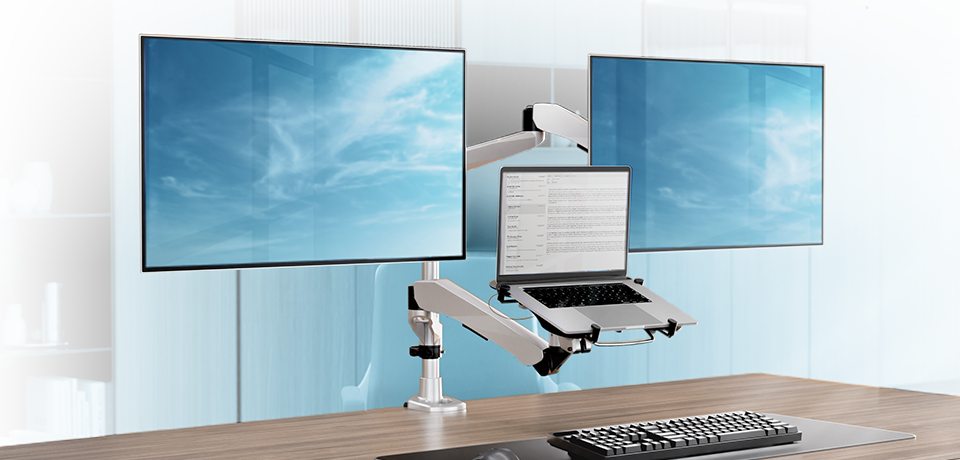


How to build a modular monitor setup
- Pick the base. A desk clamp grips the edge of the desk, a grommet base goes through a hole in the desktop, and a wall mount keeps the desk clear.
- Pick the number of arms. Start with one arm, or choose a dual, triple or quad monitor mount for up to 4 screens.
- Add a laptop tray if you need one. Monitor and laptop combo mounts hold a screen and a laptop side by side, with a cooling fan in the tray.
This makes a modular mounting system a custom monitor stand you can change later: add an arm when you add a screen. For workshops, labs and control rooms, wall-mounted arms work as an industrial monitor mount that keeps the work surface clear.
