Premium Quality with Lifetime Warranty

Use code: Sitstand26
SAVE on Sit-Stand Desks, Converters, Mobile DesksSave 15% OFF Desks

Electric Standing Desks & Sit-Stand Desks

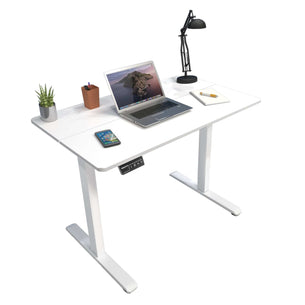
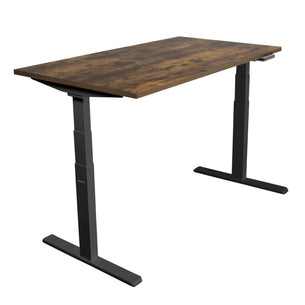
Electric standing desks let you switch between sitting and standing at the push of a button. Ours come with 40" to 72" tabletops and single or dual motors, and are rated up to 220 lb. Height ranges run from 28.7" to 46.5" on the compact desks up to 25.4" to 51.4" on the Ultimate dual motor desks. We also make L-shaped and corner desks and hand crank models.

Shop by type: desk frames for your own tabletop, standing desk converters that sit on the desk you have, mobile desks on wheels, wall mounted desks and kids desks.

Sit-Stand Desks - Mount-It!

Experience the Ergonomic Benefits of Standing Desks

In a perfect world, we wouldn't spend so many hours at our desks staring at monitors...however, that's quickly becoming the opposite and more needs to be done to improve your quality of life at the workplace. However, the old conventional desk frame just isn't dynamic enough for the demands of the modern workplace. The solution to this sedentary lifestyle, an ergonomic workstation complete with an adjustable standing desk. On demand height adjustment allows you to switch from sitting to standing seamlessly throughout your work day and increase productivity! Let's explore why this ergonomic standing desk is the perfect desk solution for your workspace.

Are Standing Desks Good For You?

Ergonomic studies have shown that using a standing workstation desk for at least part of your workday can provide energy and chiropractic benefits and possibly relieve some body pain or discomfort. Moreover, a sit stand workstation gives you the flexibility to set the exact correct desk height and avoid poor body & wrist positioning which can impact your health.

When sitting for prolonged periods of time, many people begin to feel joint pain or hold tension in their legs, shoulders, and neck. An easy way to fix this is by switching over to an ergonomic workstation that includes a height adjustable desk and a proper adjustable office chair.

The Different Types of Standing Desks

The ultimate ergonomic desk solution is an electric standing desk with no crank or lifting mechanism. An electric height-adjustable desk is the ultimate solution for you to improve your ergonomics. Many come with a digital control panel that even allows you to save the exact measurement for your desired height adjustment in inches.

This design also makes it easy to change positions from sitting position to standing position on a regular basis and can help with good posture. However, we also offer stand up desks with manual hand crank height adjustment.

In addition to the above mentioned sit stand desk models, there are also standing desk converters, that can simply be placed on top of a traditional desk to create a more dynamic workstation. They come with convenient electric height adjustment as well as easy gas-spring manual height adjustment. Another alternative are wall mounted standing desk workstations. Especially in environments with little space for a desk, such as in a warehouse, on a production floor or in a workshop, wall mount desks are a great option to work comfortably at an ergonomic height.

Adjustable Height Desks Provide Customizable Comfort

Did you ever start a new job and were assigned a desk that was either too low or too high for you? You are not alone! Not everyone is average height or has the same body, why would we provide all employees with the same desk? A height adjustable chair and desk are key for an ergonomic workspace that adapts to the user - not vice versa. To ensure you minimize the health risks that come with many hours sitting at your desk, it is important to pay attention to your posture. Sit up straight with your back against the chair and your legs in a 90° angle. Your elbows should also be at a 90°-100° angle when typing on your keyboard, or using your computer mouse. With an adjustable standing desk, you can be sure to achieve that perfect height that suits your personal needs. Plus, you can switch from sitting to standing regularly throughout the day.

Transform Your Health and Productivity with Sit-Stand Desks

Ready to see how our ergonomic desk options can help improve your comfort throughout the workday and find the best standing desk for your needs? Excited to finally get rid of that sedentary lifestyle? Ditch the old office desk and stop sitting down for prolonged periods and improve your physical activity with a stand-up desk from Mount-It. We also offer desk TV wall mounts, adjustable keyboard tray mount, kids desk, tablet mounts, laptop stands and many more. Check out what we have in store today including our full selection of desks for every environment!

Guides

Frequently Asked Questions

Should I get a standing desk or a standing desk converter?

A converter keeps the desk you have. It sits on top, lifts your screen and keyboard by up to about 16 to 21 in depending on the model, and holds up to 55 lb. It is the simpler choice for a shared desk, a rented office or a desk you want to keep.

A standing desk replaces the desk and lifts the whole top. Ours have 40" to 72" tabletops and are rated 132 to 220 lb, so they suit larger setups, heavier equipment and several monitors. See standing desk converters and electric standing desks.

What is the difference between single and dual motor standing desks?

Load, speed and noise. Our single motor desks and bases are rated 154 lb, move about 0.8 in per second and run under 55 dB.

Our dual motor desks are rated 176 to 220 lb. The dual motor desks with 48" to 72" tops and 2-stage legs move 1 in per second and run under 50 dB. The Ultimate 55" desk and the 3-stage frame (MI-8030) move 1.5 in per second. All our 60" and 72" desks are dual motor.

What size standing desk do I need for two monitors?

A standing desk for two monitors needs to be wide enough to fit both screens, deep enough for healthy viewing distance, and rated to support the combined weight of monitors, mounts, and equipment.

Width recommendations:

  • Two 24 inch monitors: at least 48 inches; 55 to 60 inches preferred.
  • Two 27 inch monitors: minimum 55 inches; 60 inches or wider is more comfortable.
  • Two 32 inch monitors: minimum 63 inches; 70 to 72 inches preferred.
  • One ultrawide (34 inch) plus one secondary monitor: 60 to 72 inches.
  • Two ultrawides (34 inch each): 72 inches or wider.

Depth: A desk depth of at least 28 to 30 inches gives space for monitors plus keyboard, mouse, and forearm rest.

Weight capacity: A quality electric standing desk supports 200 to 350+ lbs, well within the 50 to 100 lbs typical of dual monitor setups.

Standing desk features that matter for dual monitor use: Sturdy frame with low wobble at full standing height. Programmable height presets. Cable management tray. Compatibility with monitor arm mounting (clamp or grommet).

Mount-It! offers electric and adjustable sit-stand desks in a range of sizes, with weight capacity, height range, and surface dimensions listed on every product page.

What should I look for in a standing desk for a home office?

A standing desk for home-office use should adjust smoothly between sitting and standing height, support the user's full equipment load without wobble, and fit the room and the workflow.

Motor and adjustment: Electric (motorized) lift is the gold standard. Look for dual-motor desks for faster lifting and longer motor life. Hand-crank or pneumatic desks are slower to adjust.

Height range: The desk should adjust low enough for sitting (around 25 to 27 inches at the desktop) and high enough for standing (around 47 to 50 inches accommodates users up to 6 feet 4 inches).

Weight capacity: A quality electric desk supports 200 to 350+ lbs, more than enough for monitors, mounts, laptop, and accessories.

Frame stability: A stable frame with minimal wobble at full standing height is critical. Look for cross-brace frames or steel construction with reinforced joints.

Desktop size: 48 to 60 inches for single monitor; 60 to 72 inches for dual monitors. Depth 28 to 30 inches gives space for monitor arms and a keyboard.

Programmable height presets: A control panel with 2 to 4 preset heights lets you store your sit and stand positions and switch with one button.

Noise level: Quieter motors (around 50 dB or below) matter for video calls.

Cable management: Look for an integrated cable tray or grommet holes for monitor cables and accessories.

Mount-It! offers electric sit-stand desks in multiple sizes with height range, weight capacity, motor type, and cable management features published on every product page.

What is the weight capacity of a dual motor electric standing desk with a 72 inch tabletop?

Our Dual Motor Electric Standing Desk with 72" Tabletop, with a black or white base, is rated 220 lb including the tabletop. It adjusts from 29.3" to 48.2", has 3 memory settings and runs under 50 dB. The tabletop is 72 x 29.5 x 1 in MDF.

If you build your own desk, the frames are rated 220 lb too: the Dual-Motor 3-Stage frame (MI-8030) adjusts from 24.4" to 50.4" with a width of 39.4" to 66.9", and the Dual Motor base (MI-8034) adjusts from 28.3" to 47.2". See desk frames.

Can I get replacement parts for my mount (screws, brackets, etc.) if something breaks?

Yes. Every Mount-It! product comes with a LIFETIME WARRANTY, and replacement parts are available at any time.

If you have lost or damaged hardware on a Mount-It! mount, contact our customer service to request specific parts: [email protected] or 1 (855) 915-2666. Provide your model number (e.g. MI-XXXX) and a description of the part. Replacement parts under warranty are typically supplied at no cost.

For generic hardware in a pinch, you can find metric bolts (M4, M6, M8) at a hardware store, use the exact specifications and don't substitute random screws. Match size, length, and grade. The mount's manual parts list helps identify what to ask for.

Hold on to spares that came with the kit. If something like a plastic end cap breaks, that's not critical; but if a structural part goes, definitely replace it before using the mount further. Our lifetime warranty covers this for the life of the product.

Should I consider professional installation or is DIY okay?

DIY installation is the right choice for Mount-It! TV wall mounts. Mount-It! products are designed and engineered for direct customer installation, no professional installation is required for any product in our catalog.

What you need:

  • Basic tools: stud finder, drill with appropriate bits, level, tape measure, screwdriver or socket wrench. Mount-It! also offers a TV Mount Installation Kit.
  • A helper for larger TVs (65 inches and up) or for full-motion mounts where the wall plate spans two studs.
  • 30 to 90 minutes depending on TV size, mount type, and wall material.

What every Mount-It! mount includes for a successful DIY install:

  • Step-by-step printed instructions in the box.
  • All required hardware (lag bolts, M4/M6/M8 mounting bolts, washers, spacers, anchors).
  • Published VESA range, weight capacity, supported wall types, and stud-spacing requirements on every product page.
  • Online installation videos and a downloadable user manual linked from the product page.
  • 24-hour AI chat support on mount-it.com plus U.S.-based customer service Monday through Friday 5am to 5pm PST.

If you have any installation questions before, during, or after the install, contact Mount-It! customer service at [email protected] or 1 (855) 915-2666. Professional installation is not required and does not extend the warranty in any way.

What warranty do Mount-It! TV wall mounts have, and what if something is defective?

Every Mount-It! product, including all TV wall mounts, monitor mounts, vehicle mounts, sit-stand desks, and accessories, comes with a LIFETIME WARRANTY. Always.

What the lifetime warranty covers:

  • Defects in materials and workmanship for the lifetime of the product.
  • Replacement parts at no cost if a component fails under normal use.
  • Replacement of the full product if a manufacturing defect cannot be resolved with replacement parts.

How to use the warranty: Contact Mount-It! customer service at [email protected] or 1 (855) 915-2666 (Monday-Friday 5am to 5pm PST). 24-hour AI chat is also available on mount-it.com. Have your order number, the product SKU (MI-XXXX), and a description of the issue ready. A photo speeds up resolution. Most replacement-part requests are resolved within one business day.

What is not covered:

  • Damage caused by improper installation contrary to the included instructions.
  • Damage caused by exceeding the published weight capacity, VESA range, or supported TV size.
  • Damage caused by accidents, modifications, or use outside the product's intended purpose.

The lifetime warranty is unconditional on Mount-It!'s side as long as the product was used as intended.