Premium Quality with Lifetime Warranty

Tilting TV Mounts

Give Dad the Upgrade
He'll Use
Every Day

SAVE 15% Use CodeDAD26
?

Code not valid for B2B accounts and cannot be used with B2B pricing or POs or combined with other codes and is not valid on sale items. Quantities are limited and subject to change.

A tilting TV mount offers a versatile solution, allowing you to achieve the ideal viewing angle for your television. With adjustable tilt mount functionality, these mounts enable you to tilt your TV vertically, providing optimal positioning for reducing glare and enhancing picture quality. Each tilted TV mount is engineered with durable materials and easy installation, these mounts provide stability and security while offering the flexibility to tilt your TV to the perfect angle. Upgrade your home entertainment setup with our Tilting TV Mounts and enjoy a customized viewing experience tailored to your preferences with the best tilt mount options available.

All I wanted and more!

Will it fit your TV? Enter your TV once — we’ll flag every mount that fits and let you filter to just those.

  • The Mount-It! Compact Full Motion TV Wall Mount is a black metal bracket for flat-screen TVs or monitors. It features adjustable arms, multiple screw holes, and a low-profile design for versatile installation. Modern living room with brown leather sofas, dark wood entertainment unit, a Mount-It! Compact Full Motion TV Wall Mount for the TV, large window with dark curtains, framed wall pictures, and a coffee table with books and a plant.
    15% OFF with code DAD26

    Compact Full Motion TV Wall Mount

    4.8
    Rated 4.8 out of 5 stars
    4 Reviews

    17" to 50" 44 lbs Tilt & swivel

  • 42.5" Frame TV Mount - Heavy-Duty Dual TV Ceiling Mount - Mount-It! - MI-512B 62.2" Frame TV Mount - Heavy-Duty Dual TV Ceiling Mount - Mount-It! - MI-512L
    15% OFF with code DAD26
  • A flat-screen TV mounted on a wall with the Mount-It! Tilting TV Wall Mount, a black adjustable bracket featuring two pull-down straps hanging below the TV. A modern living room features a wooden TV stand and a large flat-screen TV on the Mount-It! Tilting TV Wall Mount. Books and decor are displayed on the stand, while light walls and parquet floors complete the stylish space.
    15% OFF with code DAD26

    Tilting TV Wall Mount

    4.8
    Rated 4.8 out of 5 stars
    5 Reviews

    42" to 80" 110 lbs Tilting

  • Black TV Mount - Motorized Ceiling TV Mount - Mount-It! - MI-4226BLK TV Mount - Motorized Ceiling TV Mount - Mount-It! -
    15% OFF with code DAD26

    Motorized Ceiling TV Mount

    4.7
    Rated 4.7 out of 5 stars
    3 Reviews

    50" to 90" 88 lbs Tilting

    Color:
  • TV Mount - Heavy-Duty Tilt TV Wall Mount - Mount-It! - MI-303B TV Mount - Heavy-Duty Tilt TV Wall Mount - Mount-It! - MI-303B
    15% OFF with code DAD26

    Heavy-Duty Tilt TV Wall Mount

    4.0
    Rated 4.0 out of 5 stars
    1 Review

    37" to 80" 175 lbs Tilting

  • The Mount-It! Tilting TV Wall Mount in black features a slim profile, multiple adjustment holes, and an integrated top-center bubble level for secure, stylish flat-screen TV installation. A minimalist living room features a Mount-It! Tilting TV Wall Mount with a slim, art-like frame on a white wall, above a light wood console. A small plant, retro radio, and cup decorate the console; part of a gray couch appears in front.
    15% OFF with code DAD26

    Tilting TV Wall Mount

    4.8
    Rated 4.8 out of 5 stars
    18 Reviews

    37" to 100" 165 lbs Tilting

  • TV Mount - Heavy-Duty Tilt TV Wall Mount - Mount-It! - MI-318L TV Mount - Heavy-Duty Tilt TV Wall Mount with Slim Profile - Mount-It! - MI-318L
    15% OFF with code DAD26

    Heavy-Duty Tilt TV Wall Mount with Slim Profile

    4.5
    Rated 4.5 out of 5 stars
    48 Reviews

    43" to 90" 220 lbs Tilting

  • The Mount-It! Heavy-Duty Advanced Tilt TV Wall Mount in black features adjustable arms, vertical rails, and two pull cords for easy adjustment or removal. The brand logo appears at the center of this sturdy steel bracket. A modern living room features a grey lounge chair, built-in fireplace with wood accents, rug, and an empty TV wall fitted with the Mount-It! Heavy-Duty Advanced Tilt TV Wall Mount and an angled glass guide above the fireplace.
    15% OFF with code DAD26

    Heavy-Duty Advanced Tilt TV Wall Mount

    4.5
    Rated 4.5 out of 5 stars
    4 Reviews

    37" to 90" 176 lbs Full motion

  • The Mount-It! Heavy-Duty XL Advanced Tilt TV Wall Mount is a black metal bracket with adjustable arms, extended tilt, vertical rails, and built-in cable management—ideal for large flat-screen TVs. Brand logo displayed on the horizontal bar. A collage of four modern interiors, each with a large TV mounted using the Mount-It! Heavy-Duty XL Advanced Tilt TV Wall Mount. “Built for Oversized TVs in Any Setting” is displayed across the center.
    15% OFF with code DAD26

    Heavy-Duty XL Advanced Tilt TV Wall Mount

    4.5
    Rated 4.5 out of 5 stars
    4 Reviews

    55" to 105" 176 lbs Full motion

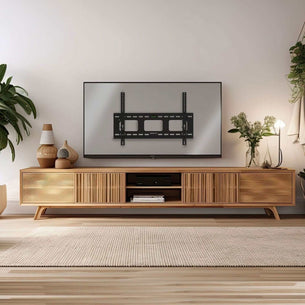
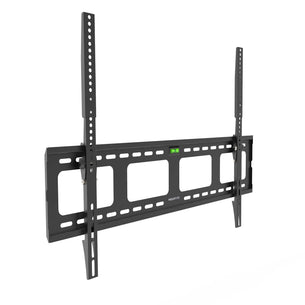
  • Black TV wall mount on a white background Modern living room with a wall-mounted TV and wooden entertainment unit.
    15% OFF with code DAD26
    Beast Series

    Heavy-Duty XXL Tilt TV Wall Mount

    4.8
    Rated 4.8 out of 5 stars
    5 Reviews

    37" to 140" 275 lbs Tilting

  • The Mount-It! Full Motion TV Wall Mount with Extra Long Extension in black features adjustable arms and a VESA-compatible plate, extending from the wall—perfect for mounting flat-screen TVs, even in corners. A flat-screen TV is mounted on the wall with the Mount-It! Full Motion TV Wall Mount with Extra Long Extension, casting a shadow in a modern living room featuring light wood shelves, decorative vases, and neutral walls.
    15% OFF with code DAD26

    Full Motion TV Wall Mount with Extra Long Extension

    5.0
    Rated 5.0 out of 5 stars
    1 Review

    23" to 65" 77 lbs Full motion

  • The Mount-It! Full Motion TV Wall Mount with Extra Long Extension in black features adjustable arms that swivel and tilt, allowing you to securely mount your flat-screen TV and extend it from the wall for flexible viewing angles. A modern living room with the Mount-It! Full Motion TV Wall Mount with Extra Long Extension above a linear fireplace, exposed wooden ceiling beams, neutral furnishings, large windows, and a contemporary, cozy vibe.
    15% OFF with code DAD26

    Full Motion TV Wall Mount with Extra Long Extension

    43" to 100" 132 lbs Full motion

  • Heavy Duty Full Motion TV Wall Mount with Extension showing a large flat screen TV mounted on a dual arm steel bracket extending away from the wall, demonstrating swivel and tilt capabilities, designed for heavy TVs with VESA patterns up to 800mm by 400mm and supporting up to 220 pounds for secure, adjustable positioning. Heavy Duty Full Motion TV Wall Mount with Extension installed in a modern living room, showcasing the dual arm extension holding a large flat-screen TV mounted close to the wall with the ability to extend outward, swivel left and right, and tilt up and down, demonstrating its sturdy steel construction and compatibility with heavy televisions for secure and flexible positioning.
    15% OFF with code DAD26

    Heavy Duty Full Motion TV Wall Mount with Extension

    4.7
    Rated 4.7 out of 5 stars
    37 Reviews

    48" to 90" 220 lbs Full motion

  • The Mount-It! Low-Profile Tilt TV Wall Mount is a black, adjustable bracket with four arms and multiple screw holes, shown isolated on a white background. The Mount-It! brand name appears on the center plate. A modern, cozy bedroom featuring a plush beige bed with soft pink bedding, bedside lamp, small framed artwork, window nook with cushion and lamp, and a desert scene on the TV mounted using the Mount-It! Low-Profile Tilt TV Wall Mount.
    15% OFF with code DAD26
    New arrival

    Low-Profile Tilt TV Wall Mount

    24" to 43" 33 lbs Tilting

  • The Mount-It! Flip-Down Ceiling TV Mount in black features an extendable arm, universal bracket, and multiple screw holes to fit flat-screen TVs of various sizes. Its adjustable design saves space and ensures easy ceiling installation. A Mount-It! Flip-Down Ceiling TV Mount secures a flat-screen monitor showing a sales growth chart in a modern office with a desk, chair, plant, and cabinets in the background.
    15% OFF with code DAD26

    Flip-Down Ceiling TV Mount

    23" to 55" 44 lbs Tilt & swivel

  • A flat-screen TV mounted on a wall with a black Mount-It! Low-Profile Tilt TV Wall Mount, with the compact bracket visible behind the center of the screen. A modern, cozy bedroom features a neatly made bed with soft beige bedding, a Mount-It! Low-Profile Tilt TV Wall Mount displaying a desert scene, small framed art, a window seat with lamp, and soft natural light filtering in.
    15% OFF with code DAD26

    Low-Profile Tilt TV Wall Mount

    4.5
    Rated 4.5 out of 5 stars
    2 Reviews

    13" to 50" 44 lbs Tilting

  • The Mount-It! Dual TV Ceiling Mount with Short Pole in black securely holds two large flat screens side by side, offering adjustable arms and full-motion flexibility—perfect for commercial spaces needing dynamic viewing angles. A modern, empty subway station features Mount-It! Dual TV Ceiling Mount with Short Pole suspending digital departure boards. Ticket machines line the wall. Text overlay at the bottom reads, Designed for commercial installations.
    15% OFF with code DAD26

    Dual TV Ceiling Mount with Short Pole

    35" to 60" 88 lbs Tilt & swivel

  • The Mount-It! Dual TV Ceiling Mount with Long Pole suspends two large flat-screen TVs side by side from an adjustable black metal pole—perfect for commercial mounting applications. A modern airport departure area features a Mount-It! Dual TV Ceiling Mount with Long Pole holding two screens—one displaying flight info, the other blank—against glass walls, trees, and a cloudy sky beyond.
    15% OFF with code DAD26

    Dual TV Ceiling Mount with Long Pole

    35" to 60" 88 lbs Tilt & swivel

  • The Mount-It! Full-Motion TV Wall Mount with 40" Extension is a black adjustable bracket for flat-screen TVs, featuring articulated arms and multiple mounting holes. A modern living room showcases the Mount-It! Full-Motion TV Wall Mount with 40" Extension, casting leaf shadows on a white wall near a beige sofa, glass coffee table, and large windows.
    15% OFF with code DAD26
    New arrival

    Full-Motion TV Wall Mount with 40" Extension

    32" to 90" 110 lbs Full motion

  • Mount-It! Weatherproof Column TV Mount
    15% OFF with code DAD26
    New arrival

    Weatherproof Column TV Mount

    37" to 83" 110 lbs Full motion

Frequently Asked Questions about Tilting TV Mounts

What VESA pattern do I need for a 75 inch TV and how do I check it?

For a 75 inch TV, the VESA mounting pattern most commonly falls in the range of 400x400 mm to 600x400 mm, with some larger or premium models using 800x400 mm or 800x600 mm. The exact pattern depends on the TV manufacturer and model.

VESA pattern explained:
The VESA pattern is the horizontal-by-vertical distance, in millimeters, between the four mounting holes on the back of the TV. A 400x400 mm pattern means the holes are 400 mm apart horizontally and 400 mm apart vertically.

How to check the VESA pattern of your TV:

  • Check the TV manufacturer's spec sheet. Search the model number plus VESA. Most major brands (Samsung, LG, Sony, TCL, Hisense, Vizio) publish the VESA pattern in the product specifications.
  • Check the TV's user manual. The mounting pattern is typically listed in the installation or wall-mount section.
  • Measure the back of the TV directly. With the TV face-down on a soft surface, measure center-to-center between the horizontal hole pair, then the vertical hole pair, in millimeters.
  • Look for a label on the back of the TV. Some TVs print the pattern next to the mounting holes.

What to do once you know your VESA pattern:
Match the pattern to a TV mount that supports the same range. Mount-It! TV wall mounts list every supported VESA pattern on the product page. If a TV's pattern is non-standard, a VESA mount adapter plate can convert between patterns.

Also confirm:

  • TV weight is within the mount's weight capacity.
  • TV size (inches) is within the mount's supported size range.
  • The wall (drywall with studs, concrete, or brick) is compatible with the mount's hardware.

What is the difference between fixed, tilting, and full-motion TV mounts?

The three main types of TV wall mounts differ in how the TV moves once installed. The right choice depends on viewing angle, room layout, and budget.

Fixed (low-profile) TV mounts:

  • The TV sits flush against the wall and does not move.
  • Lowest profile (often under 1.5 inches from the wall) and the lowest cost.
  • Best for: rooms where seating is directly across from the TV at eye level, with no glare or reflection problems.
  • Trade-off: no adjustment after install. If the viewing angle is wrong, the TV cannot be moved to fix it.

Tilting TV mounts:

  • The TV pivots vertically, typically 5 to 15 degrees downward, while staying close to the wall.
  • Slightly thicker profile than fixed (around 2 to 3 inches from the wall).
  • Best for: TVs mounted higher than eye level (above a media console, in a bedroom viewed from bed, in a high-ceiling room) where a downward tilt reduces neck strain and screen glare.
  • Trade-off: only vertical adjustment, no side-to-side swivel.

Full-motion (articulating) TV mounts:

  • The TV extends out from the wall on an arm, swivels left and right (often up to 180 degrees), and tilts up and down.
  • Largest profile when fully retracted (3 to 5 inches deep) but the most flexible.
  • Best for: corner installations, off-axis seating, multi-purpose rooms, and situations where the TV needs to be repositioned for different viewers or activities.
  • Trade-off: highest cost, more complex install (full-motion mounts must be anchored into wood studs or solid masonry, never into drywall alone), and a slightly larger footprint.

How to choose:

  • Sitting directly in front of the TV with no glare? Fixed.
  • TV mounted high or in a bright room? Tilting.
  • Off-axis seating, corner install, or multi-room visibility? Full-motion.

Mount-It! manufactures fixed, tilting, and full-motion TV wall mounts across every common TV size and weight class, with the supported VESA pattern, weight capacity, and arm extension published on every product page.

What wall mount should I use for a 55 inch Samsung TV with VESA 400x400?

A 55 inch Samsung TV with VESA 400x400 mm is compatible with most standard TV wall mounts that support the 400x400 mm pattern in their VESA range. The right specific mount depends on weight, viewing angle, and use case.

Weight check first: Most 55 inch Samsung TVs weigh 30 to 55 lbs without the stand. Confirm your model's weight in the spec sheet. The mount you choose must support that weight, with comfortable headroom.

Mount type by use case:

  • Fixed (low-profile) mount: TV sits flush against the wall. Best when seating is directly across from the TV at eye level and there is no glare. Lowest cost, simplest install.
  • Tilting mount: TV pivots vertically 5 to 15 degrees downward. Best when the TV is mounted higher than eye level.
  • Full-motion (articulating) mount: TV extends out, swivels, and tilts. Best for off-axis seating, corner installs, or open-plan rooms.

Samsung-specific note: Many Samsung TVs require longer M8 mounting screws than standard mounts include, because Samsung backs are deeper or recessed. If the screws in your mount kit do not reach the threaded inserts in the TV, you need longer M8 bolts. Mount-It! offers an M8 screw kit (MI-M8KIT) for this.

Wall and hardware:

  • Mount into wood studs or solid masonry. Drywall alone is not strong enough.
  • Verify the mount's stud-spacing requirement matches your wall.

Mount-It! offers VESA 400x400-compatible TV wall mounts in fixed, tilting, and full-motion configurations.

How do I adjust the tilt and swivel of my mounted TV?

It depends on your mount type:
Tilting Mount: These usually have two tension knobs or screws on the sides of the bracket behind the TV. To adjust the tilt, you may need to loosen the knobs slightly, set the desired angle (tilt up or down), then tighten them to lock it in place. Some tilting mounts are tool-free and just require you to tilt by hand with firm pressure (they use friction to hold position). You'll feel resistance which is normal, it's what keeps the TV from tilting by itself. Just support the TV's weight as you adjust.
Full-Motion (Swivel) Mount: Full-motion arms allow swivel (left-right pivot) and often tilt as well. Usually, you can swivel the TV by gently pulling/pushing on one side of the TV. Move it slowly, the arm should pivot at the joints. For tilt on these, there might be a tilt bolt behind the TV you loosen as above.
Rotation (Leveling): Some mounts even let you rotate the screen slightly (to fix leveling). This might be a screw on the wall plate or part of the bracket assembly. Only a few degrees usually.
After installation, you might need to experiment to find the best angle. Always hold the TV with two hands when making adjustments.

The TV tilt keeps sagging or won't stay in place – how can I fix that?

If your TV is drifting downward or the tilt joint seems loose (sagging tilt), try the following: Tighten the tilt mechanism. Most tilt mounts have adjustment screws or knobs. Locate them and tighten with a screwdriver or wrench. You want it tight enough to hold the TV's angle, but not so tight that you can't adjust when needed. Check weight capacity: if you've tightened fully and it still sags, the TV may be near the mount's weight limit. Even pressure: if your mount uses two knobs on either side, tighten them evenly. Internal mechanism: some tilting mounts have a spring or gear mechanism, make sure it's engaged correctly per the instructions. Most of the time, tightening the tilt locking screws resolves sag.

My TV has a lot of glare but my mount doesn't tilt. Any way to reduce glare without tilt?

Glare issues are usually due to lights or windows reflecting on the screen. If your current mount is fixed (no tilt): Address lighting, the cheapest fix is to alter the environment. Use curtains or blinds to control sunlight. Adjust or turn off offending lights when watching. Anti-glare filters, there are anti-glare screen protectors/films you can apply to the TV. Upgrade to a tilting mount, for a long-term solution consider getting a tilting mount. They are not very expensive and can use the same mounting holes. A tilt of even 5-15 degrees downward can significantly reduce ceiling light glare. Mount-It! tilting mounts allow you to angle the TV downward to combat reflections. Reposition TV or seating, sometimes moving the TV to a different wall (not opposite a window) can avoid glare.

What's the most ergonomic setup for a wall-mounted TV?

For comfortable viewing (no neck or eye strain), follow these ergonomic tips. Eye-Level Center: mount the TV so that your eyes land about 1/3 from the top of the screen or at the center when you're in your usual viewing position. Typically the center of the TV ~42 inches from the floor for living room seating. Viewing Distance: ensure your seating is at a good distance for the TV size. A general rule: distance (in inches) ~ 1.5 to 2.5 times the diagonal screen size. Tilt to reduce glare and neck angle: if the TV is higher than eye level, use a downward tilt. Center to seating: if your couch is off-center from the wall, consider a full-motion mount so you can swivel the TV toward you. Eye strain considerations: bias lighting (backlight behind TV) reduces eye strain in dark rooms. Comfortable posture: you want a neutral head position. The beauty of mounts is you can tweak tilt/swivel to dial in the sweet spot.

Your TV details

Save your TV once — we’ll flag every mount that fits.

Your TV Verified by exact VESA pattern and weight
  1. 1 Brand
  2. 2 Model
  3. 3 Size