
Monitor Arms & Mounts
A monitor arm holds your screen above the desk on an adjustable arm, so you can set its height, tilt, swivel and rotation and keep the desk surface under it free. Our monitor arms and mounts hold 1 to 4 screens from 13" up to 57" ultrawide, on a desk clamp, a grommet hole or a wall, and are rated up to 55 lb per arm.
Shop by type: single monitor arms, dual monitor mounts, triple and quad monitor mounts, monitor wall mounts, monitor desk mounts and modular mounts. No desk edge or wall to use? See monitor stands and monitor risers. Or shop a series: CLiX and ProFlex.


Ultra-Wide Single Monitor Desk Mount
SKU: MI-709
Monitor sizes: 19" - 42"
Holds up to 22 lb
In stock

Single Monitor Desk Mount with Pole
SKU: MI-4761
Monitor sizes: 13" - 32"
Holds up to 17 lb
In stock

Height Adjustable Point of Sale (POS) Monitor Mount
SKU: MI-3796
Monitor sizes: 13" - 32"
Holds up to 33 lb
In stock

Low Profile Dual Monitor Desk Mount
SKU: MI-2772
Monitor sizes: 13" - 27"
Holds up to 22 lb per monitor
In stock

 CLiX Series
Full Motion Single Monitor Wall Mount with Gas Spring Arm
SKU: MI-35114
Monitor sizes: 13" - 32"
Holds up to 19 lb
In stockColor:
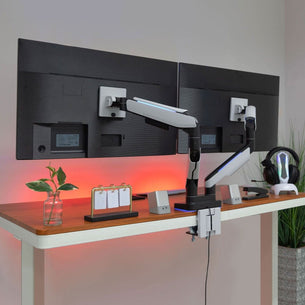
Heavy Duty Dual Monitor Arm For Screens Up To 35"
SKU: MI-4882
Monitor sizes: 17" - 35"
Holds up to 44 lb per monitor
In stock

Dual Monitor Desk Mount w/ USB Ports
SKU: MI-2762
Monitor sizes: 19" - 32"
Holds up to 17 lb per monitor
In stock


Full Motion Dual Monitor Desk Mount
SKU: MI-4752
Monitor sizes: 17" - 32"
Holds up to 19 lb per monitor
In stockColor:

Full Motion Single Monitor Desk Mount, Height Adjustable with Gas Spring Arm
SKU: MI-6771
Monitor sizes: 19" - 32"
Holds up to 19 lb
In stock
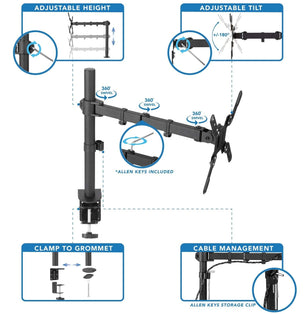


 CLiX Series
Full Motion Single Monitor Wall Mount
SKU: MI-33114
Monitor sizes: 13" - 34"
Holds up to 30 lb
In stockColor:

 CLiX Series
Full Motion Dual Monitor Wall Mount
SKU: MI-43114
Monitor sizes: 13" - 34"
Holds up to 22 lb per monitor
In stockColor:

Full Motion Dual Monitor Desk Mount
SKU: MI-1752
Monitor sizes: 13" - 27"
Holds up to 17 lb per monitor
In stock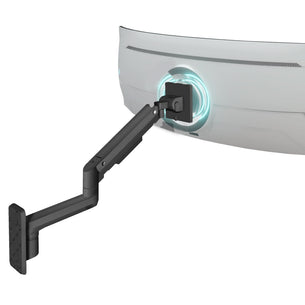
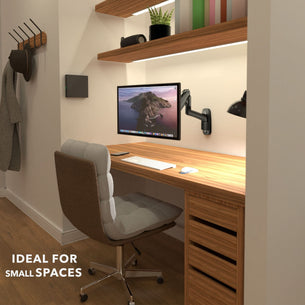 ProFlex Series
Heavy-Duty Monitor Wall Mount with Gas Spring Arm
SKU: MI-12009
Monitor sizes: 17" - 49" Ultrawide
Holds up to 44 lb
In stock
 ProFlex Series
Dual Monitor Wall Mount with Gas Spring Arm and Crossbar
SKU: MI-12010
Monitor sizes: 17" - 32"
Holds up to 19 lb per monitor
In stock

Counterbalance Monitor Arm for Wall and Pole Mounting
SKU: MI-1765
Monitor sizes: 17" - 32"
Holds up to 15 lb
In stock


Dual Monitor Mount with Spring Arms
SKU: MI-8752BLK
Monitor sizes: 17" - 32"
Holds up to 19 lb per monitor
In stock


How to choose a monitor arm
Five checks decide which arm fits: how many screens, how big and heavy they are, the VESA pattern, how the arm attaches, and whether you need an arm at all.
1. Number of screens and layout
We make single, dual, triple and quad monitor mounts, including vertical dual mounts that stack two screens. Two single arms let you place each screen anywhere on the desk. One dual arm uses one base and one clamp. Compare dual monitor mounts, triple monitor mounts and 4 monitor stands, or read our dual monitor setup guide.
2. Screen size and weight per arm
Weight ratings are per arm. Use your monitor's weight without its stand. Many of our arms fit screens up to 32" at 17.6 to 22 lb per arm. For ultrawide and heavier screens, the heavy duty MI-4881 (desk) and MI-12009 (wall) fit up to 49" and 44 lb. Gas spring arms are set for a weight range, so check the minimum as well as the maximum.
3. VESA pattern
Most of our arms take 75x75 and 100x100 mm VESA patterns (see what a VESA pattern is). A few, such as MI-709 and MI-4771, also take 200x100 and 200x200. If your monitor has no VESA holes, add a VESA adapter.
4. How the arm attaches
A desk clamp grips the back edge of the desk with no drilling. A grommet mount bolts through a hole in the desk. A wall mount screws into the wall (see monitor wall mounts), and some arms also fit a pole. Each product page lists the desk thickness its clamp and grommet fit.
5. Arm, stand or riser
An arm is fixed to the desk or wall and moves freely. A monitor stand sits on the desk with no clamp. A monitor riser is a platform that raises the screen; some are height adjustable or add storage.
Want the full checklist with examples? Read how to choose a monitor arm.
