Premium Quality with Lifetime Warranty

15% OFF All Monitor Mounts Code: EYELEVEL26 Shop Now

Monitor Arms & Mounts

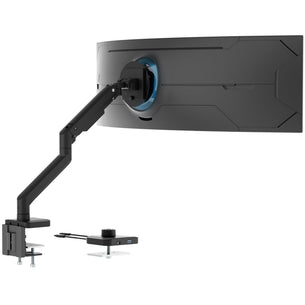
A monitor arm holds your screen above the desk on an adjustable arm, so you can set its height, tilt, swivel and rotation and keep the desk surface under it free. Our monitor arms and mounts hold 1 to 4 screens from 13" up to 57" ultrawide, on a desk clamp, a grommet hole or a wall, and are rated up to 55 lb per arm.

Shop by type: single monitor arms, dual monitor mounts, triple and quad monitor mounts, monitor wall mounts, monitor desk mounts and modular mounts. No desk edge or wall to use? See monitor stands and monitor risers. Or shop a series: CLiX and ProFlex.


How to choose a monitor arm

Five checks decide which arm fits: how many screens, how big and heavy they are, the VESA pattern, how the arm attaches, and whether you need an arm at all.

1. Number of screens and layout

We make single, dual, triple and quad monitor mounts, including vertical dual mounts that stack two screens. Two single arms let you place each screen anywhere on the desk. One dual arm uses one base and one clamp. Compare dual monitor mounts, triple monitor mounts and 4 monitor stands, or read our dual monitor setup guide.

2. Screen size and weight per arm

Weight ratings are per arm. Use your monitor's weight without its stand. Many of our arms fit screens up to 32" at 17.6 to 22 lb per arm. For ultrawide and heavier screens, the heavy duty MI-4881 (desk) and MI-12009 (wall) fit up to 49" and 44 lb. Gas spring arms are set for a weight range, so check the minimum as well as the maximum.

3. VESA pattern

Most of our arms take 75x75 and 100x100 mm VESA patterns (see what a VESA pattern is). A few, such as MI-709 and MI-4771, also take 200x100 and 200x200. If your monitor has no VESA holes, add a VESA adapter.

4. How the arm attaches

A desk clamp grips the back edge of the desk with no drilling. A grommet mount bolts through a hole in the desk. A wall mount screws into the wall (see monitor wall mounts), and some arms also fit a pole. Each product page lists the desk thickness its clamp and grommet fit.

5. Arm, stand or riser

An arm is fixed to the desk or wall and moves freely. A monitor stand sits on the desk with no clamp. A monitor riser is a platform that raises the screen; some are height adjustable or add storage.

Want the full checklist with examples? Read how to choose a monitor arm.

Frequently Asked Questions

What does a monitor arm do?

A monitor arm holds a monitor by the VESA holes on its back and lifts it off the desk. You can raise, lower, tilt and swivel the screen, and on most arms rotate it, and the desk space under it stays free.

Mount-It! monitor arms clamp to the desk edge, bolt through a grommet hole or mount on a wall. They fit screens from 13" up to 57" ultrawide and are rated from 14.8 to 55 lb per arm, depending on the model. See single monitor arms and dual monitor mounts.

Do you have to drill a hole in your desk for a monitor arm?

No, not with a desk clamp: it grips the back edge of the desk. A grommet mount bolts through a hole, so you drill only if your desk has no cable hole. Each Mount-It! product page lists the desk thickness its clamp and grommet fit.

How to Choose the Right Monitor Mount

Selecting the correct monitor mount is crucial for maximizing its benefits. Consider the following factors to ensure you choose the ideal mount for your needs:

  • Number of Monitors: Do you need a single or dual monitor mount?
  • Monitor Size & Weight: Ensure the mount is compatible with your monitor's size and weight (check the VESA compatibility).
  • Mounting Type: Consider desk clamp, grommet mount, or wall mount options based on your setup.
  • Adjustability: Look for mounts with tilt, swivel, and height adjustability for personalized comfort.
  • Desired Arm Type: Choose from gas spring arms for fluid motion, or fixed arms for a sturdy, more budget friendly option.

Need help? Contact our support team for personalized recommendations.

Are monitor arms worth it?

Yes, if you spend long hours at a desk. An arm lets you set the screen at eye level and at the right distance, and it frees the desk space under the screen.

Do all monitors work with monitor arms?

Most monitors fit if they have four VESA holes on the back, usually 75x75 or 100x100 mm, and weigh no more than the arm's rating. A monitor without VESA holes needs a VESA adapter. Use our guide to check if your monitor can be mounted.

Will this monitor arm support my monitor's weight?

A monitor arm has a published weight capacity range, typically expressed as a minimum and a maximum (for example, 4.4 to 19.8 lbs per arm). Your monitor's weight must fall inside that range, not just under the maximum.

Why minimum weight matters: Most premium monitor arms use gas-spring or mechanical-spring tension to hold the monitor at any height. The spring is calibrated to a weight range. If your monitor is lighter than the minimum, the arm will drift upward; if heavier than the maximum, the arm will drift downward or sag.

How to check your monitor's weight:

  • The monitor manufacturer's spec sheet lists the weight with stand and without stand. The arm needs to support the weight without stand.
  • For an estimate: most 24 inch monitors weigh 8 to 15 lbs without stand; 27 inch monitors typically weigh 12 to 20 lbs; 32 inch monitors weigh 15 to 30 lbs; ultrawide and 4K models can weigh more.

Other fit checks:

  • VESA pattern: the monitor must have a 75x75 mm or 100x100 mm VESA pattern. If not, a VESA adapter kit is required.
  • Total arm load if dual-arm: a dual monitor arm has a weight rating per arm.
  • Mount type fit: clamp mounts need desk edges of compatible thickness; grommet mounts need a hole through the desk surface.

Mount-It! monitor arms publish per-arm weight capacity, supported VESA patterns, and clamp/grommet compatibility on every product page.

How much weight can a monitor arm hold?

Ratings are per arm and count the monitor without its stand. Many Mount-It! arms hold 17.6 to 22 lb per arm. The heavy-duty MI-4881 holds 4.4 to 44 lb and the MI-4891 up to 55 lb. Gas spring arms also have a minimum weight, so check both ends of the range on the product page.

What monitor mount works for two monitors of different sizes?

Two monitors of different sizes can be mounted on a dual monitor arm or on two independent single arms, as long as the arms support each monitor's individual weight, VESA pattern, and screen size.

What to look for:

  • Independent height adjustment per arm. Each arm needs to move up and down independently to align both screens to your eyes.
  • Independent tilt and swivel per arm. Different sizes mean different bezel heights and viewing angles.
  • Per-arm weight capacity that fits the heavier of the two monitors.
  • VESA compatibility for both monitors. Monitor VESA patterns are typically 75x75 mm or 100x100 mm.
  • Total span and arm reach. Independent arms with enough horizontal reach let each screen be positioned correctly.

Dual monitor arm vs two single arms:

  • A dual arm has both monitors on a single base/clamp, cleaner desk look, fewer clamps to manage.
  • Two single arms give maximum independent positioning, including different desk locations or asymmetric layouts.

Mount-It! offers single, dual, and modular monitor arms with per-arm weight capacities, VESA support, and clamp/grommet options.

What monitor arm do I need for a 32 inch monitor?

A 32 inch monitor sits at the larger end of the standard monitor range, so the arm needs higher weight capacity, the right VESA support, and enough reach for ergonomic positioning.

Weight capacity: A 32 inch monitor typically weighs 15 to 30 lbs without the stand. Choose an arm rated above your monitor's weight, ideally with 20%+ headroom.

VESA pattern: Most 32 inch monitors use a VESA pattern of 100x100 mm. Some larger or heavier 32 inch displays use 200x100 mm or 200x200 mm.

Arm features that matter for 32 inch:

  • Heavy-duty load capacity. Arms rated for 19.8 lbs or more per arm are typical for 32 inch use.
  • Long horizontal reach so the screen's center can be positioned at the user's eye line.
  • Solid construction. Heavy-gauge steel or aluminum alloy with reinforced gas spring or mechanical spring tension.
  • Tilt 45 degrees up/down and swivel 90 degrees+ each direction is standard. 360 degree rotation lets you switch between landscape and portrait.

Monitors without VESA holes: A few 32 inch monitors lack VESA mounting holes. In that case, a universal VESA adapter kit such as the Mount-It! MI-9000 (or MI-780 heavy-duty version) attaches to the back and provides a standard VESA pattern.

Mount-It! offers single and dual monitor arms rated for 32 inch and ultrawide displays, with weight capacity, VESA support, and reach distance published per product.

What monitor arm should I look for with an ultrawide monitor?

Ultrawide monitors (typically 29 inch, 34 inch, 38 inch, or 49 inch with 21:9 or 32:9 aspect ratio) are heavier and wider than standard monitors. The arm needs to be rated for the weight, support the right VESA pattern, and offer enough reach.

Weight capacity: Ultrawide monitors typically weigh 15 to 30+ lbs without the stand. Some 38 inch and 49 inch ultrawides exceed 30 lbs. Choose an arm rated comfortably above that figure (20%+ headroom).

VESA pattern: Most ultrawide monitors use a VESA pattern of 100x100 mm. Larger ones may use 200x100 mm or 200x200 mm.

Key arm features for ultrawide use:

  • Heavy-duty rating with high per-arm capacity (30 lbs or more is preferred for 34 inch+ ultrawides).
  • Single-arm preferred over dual. Ultrawides take up the desk width that two standard monitors would occupy.
  • Long horizontal reach so the screen center reaches your eye line.
  • Reinforced pivot points. The wider screen creates more torque on the pivot when tilted or swiveled.
  • Cable management. A clean cable channel along the arm prevents tangle.

Mount-It! offers heavy-duty single and dual monitor arms rated for ultrawide displays, with per-arm weight capacity, supported VESA range, and reach distance published per product.

Clamp vs grommet monitor mount: which is better?

Clamp and grommet are the two standard ways a monitor arm attaches to a desk. Neither is universally better, the right choice depends on your desk and your priorities.

Clamp mount: The arm's base clamps onto the back edge of the desk like a paper clip. A pad or jaw grips the top of the desk, and a screw tightens from below.

  • Pros: No drilling. Easy to install, remove, relocate. Works on most desks with a flat back edge.
  • Cons: Requires a back-edge surface depth of about 1 to 3 inches for the jaw to grip. May not fit desks with rolled edges or drawers blocking the clamp.
  • Desk thickness compatibility: most clamps fit 0.4 to 3 inch desk thicknesses.

Grommet mount: The arm's base bolts through a hole in the desk surface.

  • Pros: More secure attachment for heavy monitors and ultrawides. Works on desks where a clamp will not fit. Cleaner look since no clamp protrudes from the back.
  • Cons: Requires a hole in the desk. Permanent placement. Removing the arm leaves the hole.

Choose clamp if your desk has a flat back edge in the right thickness range and you do not want to drill. Choose grommet if you have a heavy monitor or ultrawide where extra holding strength matters, or your desk has rolled or thick edges.

Many Mount-It! monitor arms include both clamp and grommet hardware in the box.

How do I set up a monitor arm?

Fix the base to the desk with the clamp or grommet, attach the arm, screw the VESA plate to the monitor and hang the monitor on the arm. If the arm has a gas or mechanical spring, set its tension so the screen stays where you put it. Our monitor setup guide walks through each step.

What should I look for in a dual monitor mount for a desk?

A dual monitor mount holds two monitors side by side on a single desk attachment, freeing up desk surface and giving each screen independent height, tilt, and swivel adjustment.

Weight capacity per arm: The rating is published per arm, not total. For two 24 inch monitors at 10 to 12 lbs each, an arm rated 17.6 lbs per arm is sufficient. For 27 inch monitors at 15 to 20 lbs, look for 19.8 lbs or higher per arm. For 32 inch or ultrawide monitors, choose a heavy-duty rating of 30+ lbs per arm.

VESA support: Most monitors use 75x75 mm or 100x100 mm. Confirm the arm supports the patterns of both your monitors.

Independent arm adjustment: Each arm should move up, down, tilt, swivel, and rotate independently of the other.

  • Crossbar style: cleaner look, simpler structure, but less independent positioning.
  • Independent arm style: each monitor has its own articulating arm sharing the same desk base. More flexible positioning.

Desk attachment options: clamp clips onto the back edge of the desk; grommet bolts through a hole in the desk for more secure attachment.

Mount-It! offers dual monitor arms, dual monitor wall mounts, and modular monitor mount systems with per-arm weight capacity, supported VESA range, clamp/grommet options, and reach distance published on every product page.

What should I look for in a dual monitor arm for an L-shaped or large desk?

An L-shaped or large desk gives more flexibility for monitor placement than a standard rectangular desk, but it also creates challenges. Monitors may need to be placed at the corner, on different desk levels, or angled to face a single seated position.

Desk-attachment options:

  • For a standard L-desk corner, a clamp mount on the inside or outside corner often works, but the clamp must fit the desk's edge profile. Some L-desks have rolled or finished edges that block clamps; in that case, a grommet mount through a drilled hole is the alternative.
  • For wide L-desks where the user works from the corner, two single arms (one on each desk leg) can be positioned for the best view of each screen.
  • For large rectangular desks, a long-crossbar dual arm or a freestanding monitor stand can span the working width.

Weight capacity per arm: Match each arm to the heavier of your two monitors with 20%+ headroom. 24 to 27 inch monitors usually need 19.8 lbs/arm; 32 inch and ultrawides need heavy-duty arms rated 30+ lbs.

For wide desks, longer arm extension (15 to 20+ inches) lets the screen reach the user's eye line without forcing the user to lean forward.

Mount-It! offers dual monitor arms, single monitor arms, and modular mounts with clamp and grommet options, per-arm weight capacity, and reach distance published per product.